TwitchTranslatedPoorly
Twitch Translated Poorly
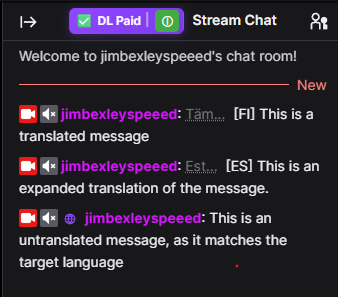
Translate twitch in realtime across multiple languages directly in the chat window.
Supports translation using the free DeepL API, the paid DeepL API, or using a locally hosted libretranslate instance.
Support
If this is useful please consider giving me a job :) Or if you can’t, I’d really appreciate a coffee
Your Translation Options
DeepL
DeepL is the easiest option, it just requires a DeepL account (note you need an API Developer account, not a Translate account).
You can use:
- DeepL Free API with a free API key.
- DeepL Pro API with a paid API key.
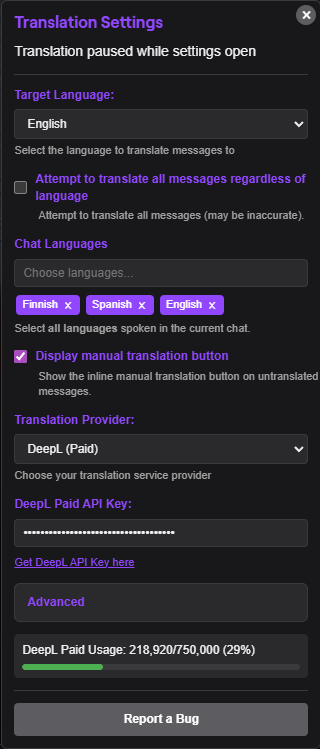
Add your key in the extension settings, pick your target language, then turn the extension on by clicking the power button.
LibreTranslate
LibreTranslate is the self-hosted option. Instead of sending chat to DeepL, you run LibreTranslate locally and point the extension at your local server.
The default local address is:
http://localhost:5000
Useful LibreTranslate links:
The extension is set up for local LibreTranslate use only.
How It Works
Open Twitch, open the extension settings from the small status button in chat, choose your provider, and pick the language you want chat translated into.
Translation is off by default when a new page loads. You can turn it on when you are ready. I suggest not enabling “Translate Everything” as this will use your API usage very quickly. Be sure to put all languages that you expect to see in the chat into the “Chat Languages” setting, so as to reduce API usage. For example, if you are watching an English and Spanish stream, but you are translating to English, you should still set “Chat Languages” to have both Spanish and English.
Install Manually
If you want to bypass the Chrome Web Store and load the extension yourself, Chrome lets you install it manually from this folder.
- Open
chrome://extensions. - Turn on Developer mode.
- Select “Load unpacked”.
- Choose this project folder.
Chrome will then load the extension directly from the files on your computer.
Privacy And Terms
If something breaks or feels odd, use the “Report a Bug” button in the extension settings, or open an issue on GitHub.